AI Solves Before It Thinks
AI coding assistants are remarkably good at generating solutions. Give them a problem, and they produce working code in seconds. But there is a fundamental flaw in this workflow:
This is not a capability problem. It is a sequencing problem. The model has the knowledge to identify edge cases, trace consequences, and weigh trade-offs. It just does not do it unless you force it to.
I built ECE (Edge Case Evaluator)to solve this. It is a structured command system that makes AI map the “butterfly effect” of every decision before proposing any solution. Think of it as a pre-flight checklist for problem-solving.
What AI Does Not Do
When you ask an AI assistant to solve a design or engineering problem, it typically does three things:
What it does not do:
The result:Solutions that work in the happy path but break in production. Edge cases discovered during QA instead of during design. Approaches chosen because they “felt right,” not because they were systematically evaluated.
How ECE Works
ECE is a set of 17 structured commands that install into any AI coding environment. Each command forces the AI into a specific mode of thinking, with strict rules about what it can and cannot do.
The core workflow follows a deliberate sequence:
Each step has guardrails. The AI cannot skip ahead. It cannot propose solutions during the mapping phase. It cannot optimize without first checking its own bias.
Spine + Leaf: Token-Efficient Evaluation
ECE uses a Spine + Leaf architecture designed for token efficiency:
The key constraint: only one leaf file is loaded at a time. This prevents token bloat and forces focused analysis. The spine is always loaded for context, but detailed work happens one node at a time.
The Full Command Set
Core Loop (8 commands)
| Command | Purpose |
|---|---|
| /ece map | Creates the initial butterfly-effect tree with 3 to 5 approaches and their immediate edge cases |
| /ece recommend | Analyzes all open nodes and suggests exactly which one to investigate next, with reasoning |
| /ece expand | Deep-dives into a specific node, tracing its downstream effects to a terminal outcome |
| /ece validate | Stress-tests a proposed mitigation to check if the fix itself introduces new risks |
| /ece trace | Follows a complete chain from any node to all its terminal outcomes |
| /ece blindspot | Adversarial self-audit for anchoring bias, confirmation bias, user influence contamination |
| /ece optimize | Scores all approaches using weighted risk-probability and recommends the safest route |
| /ece synthesize | Generates a concrete solution blueprint with requirements and acceptance criteria |
Solution Verification (2 commands)
| Command | Purpose |
|---|---|
| /ece review | Evaluates a UI screenshot against the solution blueprint, checking acceptance criteria and accessibility |
| /ece close | Finalizes the evaluation with a health score, archives results, and generates a history summary |
Prototyping (1 command)
| Command | Purpose |
|---|---|
| /ece wireframe | Generates an interactive React/Next.js wireframe from the solution blueprint. Requires prior /ece synthesize. Produces a two-panel layout: a control panel with toggle conditions, priority badges, and acceptance criteria on the left, and the primary interaction zone with state visualization on the right. All conditions derive from solution.md, nothing is invented. |
Session Management (2 commands)
| Command | Purpose |
|---|---|
| /ece resume | Detects where a previous evaluation was paused and tells you exactly what to do next |
| /ece status | Full node listing with risk, probability, confidence, and a smart next-action suggestion |
Utilities (4 commands)
| Command | Purpose |
|---|---|
| /ece test-gen | Auto-generates Given/When/Then test cases from butterfly effect chains |
| /ece impact | Builds a cross-reference matrix for compound failures between edge cases |
| /ece patterns | Identifies recurring risk categories across completed evaluations |
| /ece reset | Clears all evaluation data with confirmation |
Risk Quantification
Every node in the tree gets rated on two dimensions. The combination produces a weighted score that makes risk comparison objective rather than intuitive.
| Risk Level | Points |
|---|---|
| Critical (Red) | 10 |
| Medium (Yellow) | 3 |
| Low (Green) | 1 |
| Probability | Multiplier |
|---|---|
| Almost Certain | 1.0 |
| Likely | 0.7 |
| Possible | 0.4 |
| Unlikely | 0.2 |
| Rare | 0.05 |
Weighted Score= Risk Level × Probability. A critical edge case that is almost certain to occur (score: 10.0) is treated very differently from a critical edge case that is rare (score: 0.5). During optimization, approaches are scored by summing all weighted scores in their branch.
The Blindspot System
This is the feature that makes ECE different from any other planning tool. AI models are susceptible to specific biases during extended analysis:
The /ece blindspot command runs an adversarial self-audit with five questions on every node:
With the --lens flag, it adds a sixth question through a specific expert perspective (security, accessibility, performance, business, or resilience).
Real-World Test: Blind User Navigation
To validate ECE, I ran it on a real accessibility problem:
A navigation app for blind users has two large buttons (Stop and Repeat). The user needs a third “Call for Assistance” button, but the existing buttons are already maximized for accessibility. How do you integrate a third interaction without compromising the experience?
What ECE Mapped
Four fundamentally different approaches:
What the Blindspot Check Caught
Building and Testing the 55 Edge Cases
The blind user navigation evaluation did not stop at four approaches with a handful of risks. Using the full ECE workflow, I expanded every critical and medium-risk node, traced each one to its terminal outcome, and validated mitigations. The initial /ece map produced 4 approaches with 12 immediate edge cases. Successive rounds of /ece expand and /ece trace uncovered downstream failures that were invisible at the surface level. By the time the tree was fully mapped, the evaluation contained 55 distinct edge cases across the four approach branches.
How the Count Grew
| Phase | Command Used | Edge Cases Found | What Surfaced |
|---|---|---|---|
| Initial Map | /ece map | 12 | First-level risks per approach: gesture conflicts, haptic ambiguity, voice reliability, touch target sizing |
| Critical Expansion | /ece expand | +18 | Second-level cascades: what happens when the first failure triggers a second (e.g., haptic misfire during obstacle proximity causes wrong turn) |
| Terminal Tracing | /ece trace | +11 | Worst-case chains: a missed obstacle alert leading to a wall collision leading to panic leading to emergency call failure |
| Validation Risks | /ece validate | +8 | Mitigation side-effects: adding a confirmation dialog to the call button introduces a delay that is dangerous during an emergency |
| Blindspot Audit | /ece blindspot | +6 | Missing perspectives: network latency during calls, battery drain from continuous haptic feedback, multi-floor elevator transitions |
Testing Against the Design
Each of the 55 edge cases was tested against the final UI design using a three-step process:
From Edge Cases to Wireframe
After optimization selected the long-press gesture approach as the safest route, /ece synthesize generated the solution blueprint with requirements and constraints derived directly from the 55 edge cases. From there, /ece wireframe produced an interactive React prototype with a two-panel layout: a left panel showing all toggle conditions, priority badges, and the acceptance criteria checklist, and a right panel with the primary interaction zone where toggling conditions visually demonstrated how the UI responded to each edge case. The wireframe became the bridge between the abstract risk analysis and the concrete design decisions visible in the final screens.
Does ECE Actually Work?
I used ECE to evaluate ECE. The full evaluation is at .ece/evaluations/ece-vs-standard-planning/. I mapped 4 approaches with 16 edge cases, expanded 5 critical nodes, ran a blindspot audit on my own analysis, and optimized. Here is what the evaluation found.
Where ECE Outperforms Standard AI
| Dimension | Standard AI | ECE |
|---|---|---|
| Edge case coverage | Identifies 1 to 3 inline | Maps 12+ across 4+ approaches |
| Approach comparison | Recommends one (usually the most common) | Enumerates and scores multiple |
| Bias detection | None | Adversarial self-audit with targeted corrections |
| Risk quantification | Qualitative ("this could be an issue") | Weighted scoring (Risk × Probability) |
Where ECE is Overhead
ECE is not a replacement for everyday AI planning. For most day-to-day decisions, standard AI is faster and sufficient. ECE's value scales with the cost of getting the decision wrong.
| Problem Type | Use ECE? | Why |
|---|---|---|
| Simple CRUD feature | No | Happy path is obvious. Edge cases are minor. |
| UI layout decision | Probably not | Multiple valid approaches, but consequences are cosmetic. |
| Authentication architecture | Yes | Security edge cases are non-obvious. Consequences are severe. |
| Accessibility for disabled users | Yes | Safety implications. Missing edge cases cause harm. |
| Payment processing | Yes | Financial edge cases compound. Retry storms, race conditions. |
| Multi-service architecture | Yes | Cascading failures. Single-point analysis misses cross-system risks. |
Minimum Viable Workflow
You do not need all 17 commands for every problem. The minimum captures 80% of the value in 10 to 15 minutes:
The full workflow (with blindspot, synthesize, review, close) is reserved for high-stakes evaluations where thoroughness justifies the 20 to 40 minute investment.
Blindspot Audit on This Evaluation
I ran the blindspot check on my own self-evaluation. It flagged real issues:
Repository Layout
/ece wireframe in Action
The wireframe below was generated from a real ECE evaluation on the Indoor Navigator project — specifically the Blind Navigation Assistance Button problem. No states were invented. Every toggle condition, acceptance criterion, and edge state derives directly from the solution.md produced by /ece synthesize.
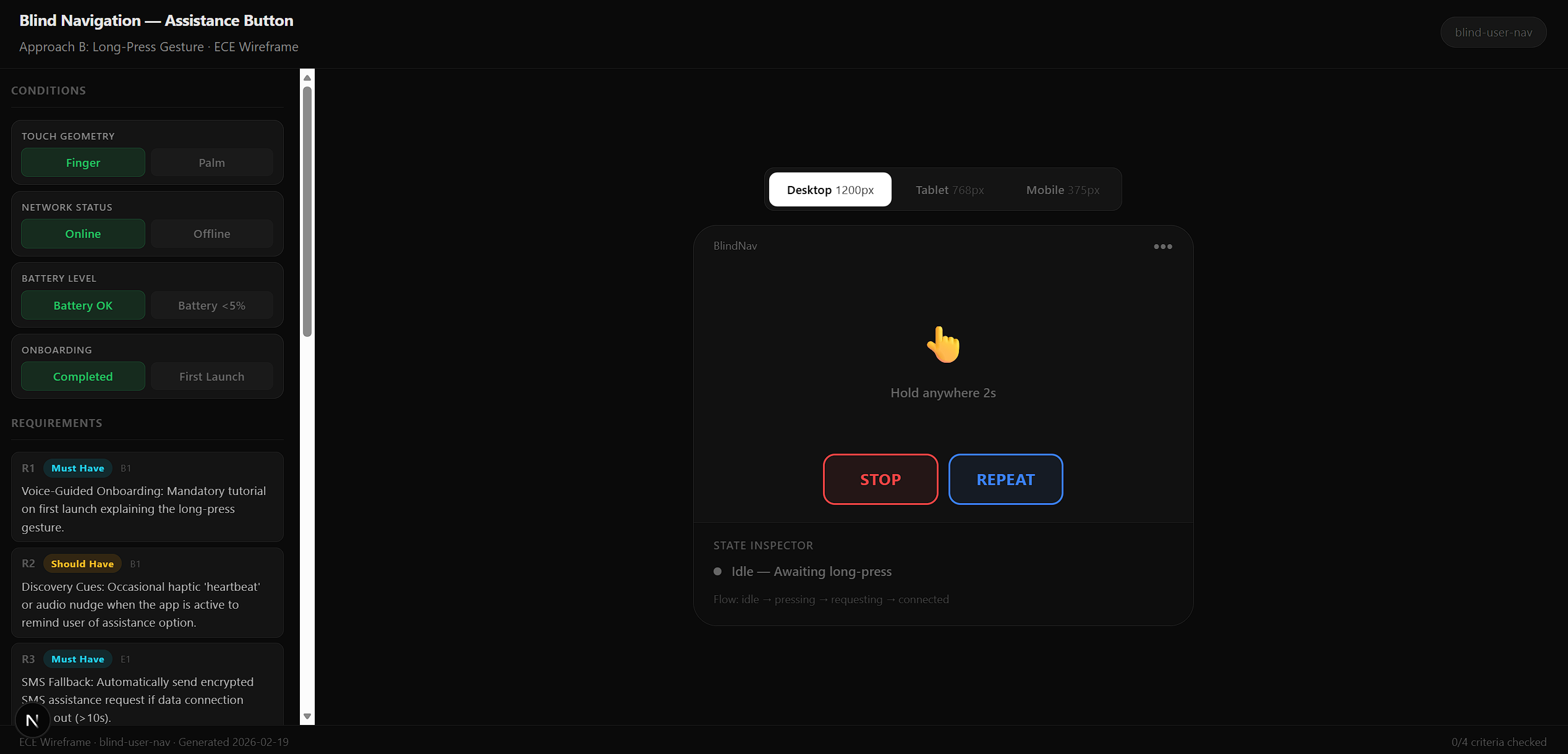
The full session recording below shows the complete flow — running /ece wireframe, toggling conditions (touch geometry, network status, battery level, onboarding state), and watching the state inspector update in real time.
The Verdict
What Remains Unproven
ECE is open source at github.com/rohitnischal01/ece. 17 commands, MIT license, installs into any AI coding environment with npx ece-evaluator ece-install.
Article
Evaluating AI-generated code governed by Markdown Skills